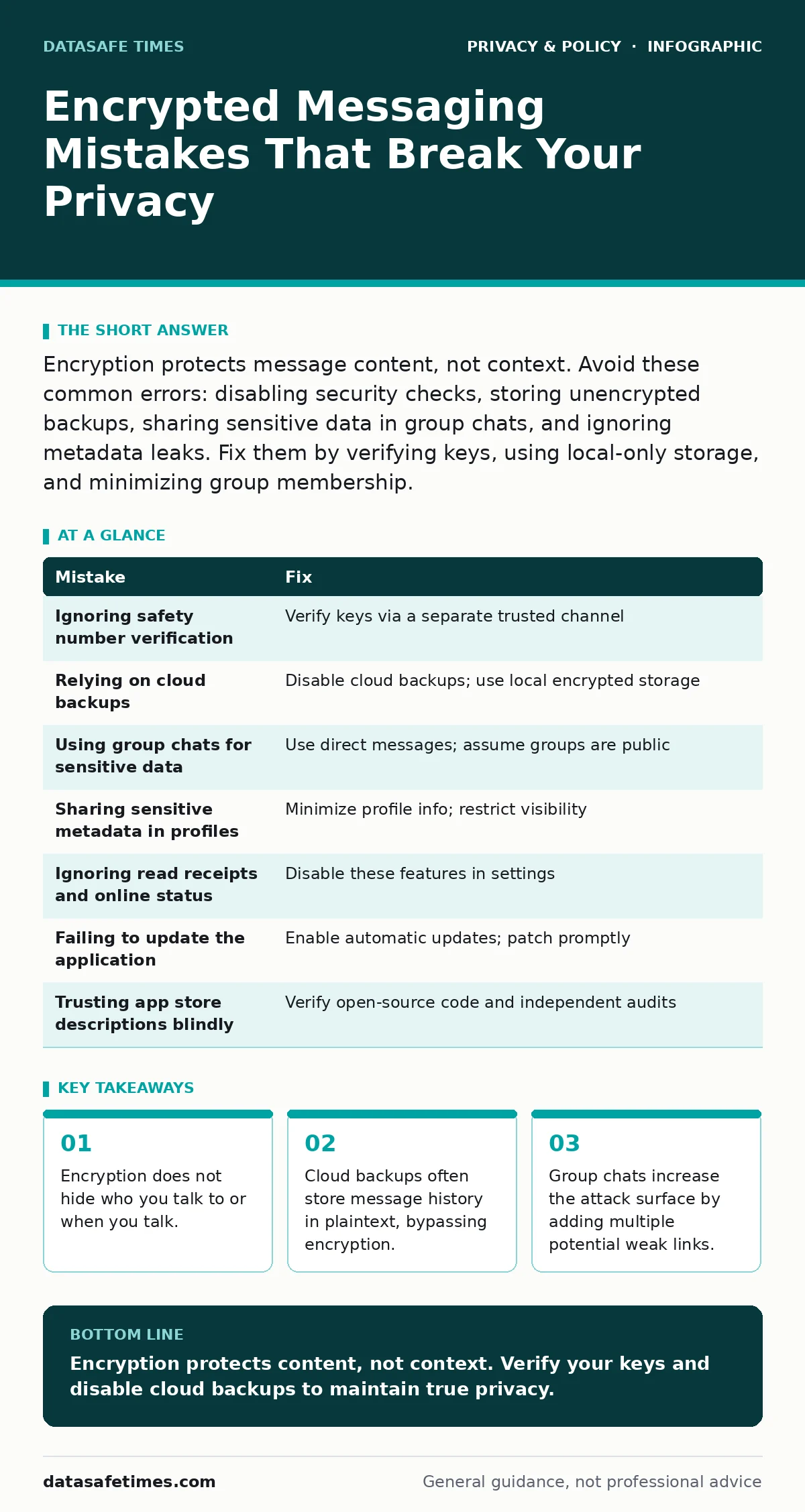
Encryption protects message content, not context. Avoid these common errors: disabling security checks, storing unencrypted backups, sharing sensitive data in group chats, and ignoring metadata leaks. Fix them by verifying keys, using local-only storage, and minimizing group membership.
Encrypted messaging provides confidentiality, meaning only the sender and receiver can read the content. It does not provide anonymity, nor does it protect the metadata that reveals who you are talking to. Many users assume that installing an app with end-to-end encryption guarantees total privacy. This assumption is incorrect. The security of your communications depends on how you configure the application and how you behave within it.
Imagine you send a message to a colleague. The app encrypts the text before it leaves your phone. The recipient’s phone decrypts it. No one in between can read the words. However, the network still sees that you contacted that colleague at a specific time. This metadata is valuable to adversaries and advertisers alike. If you do not understand the difference between content and context, you will make mistakes that undermine your security.
Mistake 1: Ignoring Safety Number Verification
Most encrypted apps generate a unique code, often called a safety number or verification code, for each contact. This code proves that the encryption keys match between your device and theirs. Without verifying this code, you cannot be sure that you are talking to the intended person. An attacker could insert themselves into the conversation, a process known as a man-in-the-middle attack.
Why it hurts: You are trusting the app’s default state rather than verifying the cryptographic identity. If the verification fails, the app might warn you, but many users dismiss these warnings to keep the conversation flowing. This allows an adversary to read and modify your messages without either party knowing.
The fix: Verify the safety number with your contact through a separate, trusted channel. Do not send the code over the encrypted app itself, as an attacker could intercept it. Use a voice call, a face-to-face meeting, or a previously established secure line. Treat this as a one-time setup step for sensitive contacts.
Mistake 2: Relying on Cloud Backups
Many users enable automatic backups to cloud storage services to preserve their message history. These backups are convenient for restoring chats if you lose your phone. However, the backup files are often encrypted with the cloud provider’s keys, not your app’s encryption keys. This means the cloud provider can access the contents of your backup.
Why it hurts: You create a plaintext copy of your private conversations on a server you do not control. If the cloud provider is hacked, subpoenaed, or compromised by insiders, your message history is exposed. The encryption in the app protects messages in transit and on the device, but the backup bypasses this protection.
The fix: Disable cloud backups for your encrypted messaging app. If you need to preserve important records, export them manually to an encrypted local drive. Use a tool that encrypts the export file with a strong passphrase before storing it. This ensures that only you hold the key to your history.
Mistake 3: Using Group Chats for Sensitive Data
Group chats are convenient for coordination, but they change the security dynamics. In a group, every participant has access to every message. The security of the group is only as strong as the weakest participant. If one member’s device is compromised, the entire conversation is exposed to that member’s adversary.
Why it hurts: You lose control over who can read your messages. You cannot verify the security posture of every person in the group. A single careless participant can screenshot a message, forward it to an unauthorized person, or have their device infected with malware. This expands the attack surface significantly.
The fix: Avoid discussing sensitive topics in groups. Use direct messages for confidential information. If a group discussion is necessary, assume the conversation is public. Do not share documents, passwords, or personal identifiers in group threads. Consider using ephemeral messages that delete themselves after a set time to limit exposure.
Mistake 4: Sharing Sensitive Metadata in Profiles
Your profile information, including your phone number, display name, and profile picture, is often visible to others. Even if your messages are encrypted, this profile data is usually not. Attackers can use this information to correlate your identity with your encrypted communications. This process is known as de-anonymization.
Why it hurts: You reveal your identity and potentially your location or employer through your profile. If you use the same profile picture across multiple platforms, an attacker can link your encrypted account to your social media profiles. This allows them to gather intelligence about you, even if they cannot read your messages.
The fix: Minimize the information in your profile. Use a generic display name that does not reveal your real identity. Avoid using profile pictures that contain identifiable features or backgrounds. Check the app’s privacy settings to limit who can see your profile information. Set visibility to "contacts only" or "nobody" where possible.
Mistake 5: Ignoring Read Receipts and Online Status
Many encrypted apps show when a message has been read or when a user is online. This feature is designed for convenience, but it provides valuable metadata. An adversary can use read receipts to determine when you are active and how you respond to specific topics. This behavioral data can be used for social engineering or targeted attacks.
Why it hurts: You reveal your patterns and reactions. If you always read messages immediately, an adversary knows you are highly engaged. If you read a message and do not reply, they know you are ignoring it. This information can be used to manipulate you or to time further attacks when you are least likely to notice.
The fix: Disable read receipts and online status indicators in your app settings. This prevents others from knowing when you have seen a message or when you are using the app. Accept that you will also lose this information about others, which is a fair trade-off for increased privacy.
Mistake 6: Failing to Update the Application
Security software requires regular updates to patch vulnerabilities. Developers discover flaws in encryption implementations or app logic after release. If you do not update your app, you remain exposed to known exploits. This is a critical failure in maintaining security hygiene.
Why it hurts: You are using software with known weaknesses. Attackers can exploit these flaws to bypass encryption, extract keys, or take control of your device. The risk increases with time, as more people discover and document the vulnerabilities. Your device becomes an easy target compared to those running the latest version.
The fix: Enable automatic updates for your encrypted messaging app. If automatic updates are not available, check for updates frequently. Do not delay updates for convenience. Security patches are not optional features; they are necessary repairs to the protective barrier around your data.
Mistake 7: Trusting the App Store Description Blindly
Not all apps labeled as "encrypted" use proper encryption. Some use server-side encryption, where the provider holds the keys. This allows the provider to read your messages. True security requires end-to-end encryption, where only the communicating users hold the keys. The app store description may not clearly distinguish between these two models.
Why it hurts: You may believe you are protected when you are not. Server-side encryption protects data from network sniffers but not from the service provider or anyone who accesses the provider’s servers. If the provider is compelled to hand over data, or if their servers are breached, your messages are exposed.
The fix: Verify that the app uses open-source code and has undergone independent security audits. Look for documentation that explicitly states end-to-end encryption. Avoid proprietary apps that do not allow third-party verification of their security claims. Transparency is a key indicator of trustworthiness in security software.
| Mistake | Fix |
|---|---|
| Ignoring safety number verification | Verify keys via a separate trusted channel |
| Relying on cloud backups | Disable cloud backups; use local encrypted storage |
| Using group chats for sensitive data | Use direct messages; assume groups are public |
| Sharing sensitive metadata in profiles | Minimize profile info; restrict visibility |
| Ignoring read receipts and online status | Disable these features in settings |
| Failing to update the application | Enable automatic updates; patch promptly |
| Trusting app store descriptions blindly | Verify open-source code and independent audits |
Key takeaways
- Encryption does not hide who you talk to or when you talk.
- Cloud backups often store message history in plaintext, bypassing encryption.
- Group chats increase the attack surface by adding multiple potential weak links.
Encryption protects content, not context. Verify your keys and disable cloud backups to maintain true privacy.
Frequently asked questions
Does encryption hide my phone number?
No, encryption hides the message content. Your phone number is often visible to contacts and the service provider unless you use a feature that hides it or use a username-based system.
Can I use encrypted apps on my computer?
Yes, most encrypted apps have desktop versions. Ensure you verify the safety number on the desktop app as well, as it generates its own key pair.
What if I lose my phone?
If you disable cloud backups, you lose your message history. This is the trade-off for security. You can still send and receive new messages on a new device.
Are encrypted apps legal?
Yes, encrypted messaging is legal in most jurisdictions. However, some countries restrict or ban certain encryption technologies. Check local laws for specific regulations.
How this guide was produced: written by the DataSafe Times editorial team with AI assistance, checked against the public references listed below, and reviewed when the facts change. See our editorial policy or report an error.