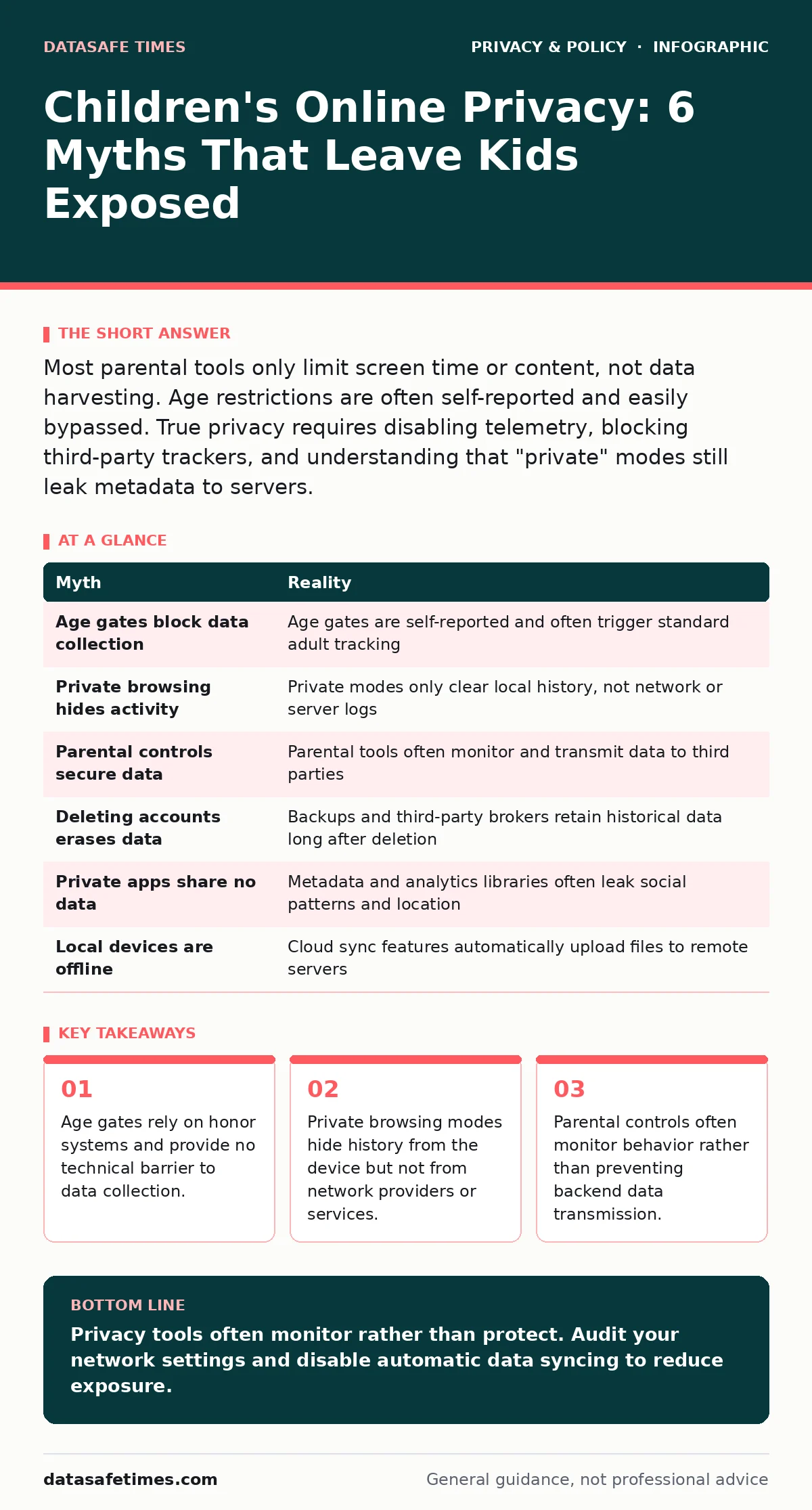
Most parental tools only limit screen time or content, not data harvesting. Age restrictions are often self-reported and easily bypassed. True privacy requires disabling telemetry, blocking third-party trackers, and understanding that "private" modes still leak metadata to servers.
Myth: Age Gates Protect Minors from Data Collection
Reality: Age gates are legal mechanisms, not technical barriers. They typically ask the user to type their birth date or select "I am over thirteen." This input is often stored and used to segment data, rather than blocking collection. The system assumes the user is honest. In practice, children rarely hesitate to lie about their age to access popular games or social platforms.
The service provider then treats the child as an adult user, subjecting them to the same tracking infrastructure. This means the data collected is often more extensive than what would be allowed if the child’s age were known. The gate exists to satisfy legal compliance, not to enforce privacy. You cannot rely on a text box to stop a script from executing.
Myth: Private Browsing Stops Tracking
Reality: Private or incognito modes only prevent the browser from saving history, cookies, and form data on the local device. They do not hide your activity from the websites you visit, your internet service provider, or network administrators. The server still receives the request and can log the IP address, device fingerprint, and browsing pattern.
Think of it as driving a car with a blacked-out license plate through a neighborhood of security cameras. The cameras still see where you go and what you look at. For a child using a shared family computer, this mode might hide visited sites from a sibling, but it offers zero protection against commercial trackers. See our guide on online tracking for details on how fingerprinting works.
Myth: Parental Controls Equal Data Privacy
Reality: Most parental control software focuses on content filtering and screen time management. These tools often require installing an agent that monitors keystrokes, screenshots, or app usage. This monitoring agent itself collects and transmits data to a third-party dashboard. You are trading one form of surveillance for another.
The data sent to the parental control provider is rarely encrypted end-to-end in a way that excludes the vendor from reading it. Furthermore, these tools often fail to block background telemetry from apps that run outside the browser. The child’s activity is still logged by the game developer, the social platform, and the ad network. Parental controls manage behavior; they do not secure the data pipeline.
Myth: Deleting an Account Erases the Data
Reality: Deleting a user account typically stops new data collection, but it does not immediately erase historical data from all systems. Service providers retain logs for legal, operational, and analytical purposes. These backups may persist for months or years. The data might also have been sold or shared with third-party data brokers before the deletion request.
Once data leaves the primary service’s control, you lose the ability to delete it. Imagine writing a letter, then burning the copy in your house. The recipient still has the original. For minors, this means the digital footprint created during adolescence can persist into adulthood. You must distinguish between account deletion and data erasure. See our guide on data subject access requests to understand the difference.
Myth: Private Apps Do Not Share Data
Reality: Many apps marketed as private or secure for messaging still collect metadata. This includes who you talk to, when you talk, and how often. Some apps also collect device information, location data, and crash reports. This metadata can reveal sensitive patterns about a child’s social circle and habits. Even if the message content is encrypted, the surrounding data is often plain text.
Third-party analytics libraries embedded in the app can also exfiltrate this information. The privacy policy may claim minimal data usage, but the code often tells a different story. You cannot trust the marketing claims without verifying the app’s network traffic. See our guide on end-to-end encryption to learn what is actually protected.
Myth: Local Devices Are Safe from Cloud Sync
Reality: Modern operating systems aggressively sync data to the cloud by default. Photos, contacts, notes, and location history are often uploaded automatically to create a seamless experience across devices. This happens even if the user believes they are storing files locally. A child’s photos taken on a tablet may instantly appear in a cloud account accessible by anyone with the password. If that account is compromised, the entire local history is exposed. Disabling these sync features requires digging into deep system settings, which many users overlook. The convenience of cloud integration comes at the cost of centralized data exposure.
| Myth | Reality |
|---|---|
| Age gates block data collection | Age gates are self-reported and often trigger standard adult tracking |
| Private browsing hides activity | Private modes only clear local history, not network or server logs |
| Parental controls secure data | Parental tools often monitor and transmit data to third parties |
| Deleting accounts erases data | Backups and third-party brokers retain historical data long after deletion |
| Private apps share no data | Metadata and analytics libraries often leak social patterns and location |
| Local devices are offline | Cloud sync features automatically upload files to remote servers |
Key takeaways
- Age gates rely on honor systems and provide no technical barrier to data collection.
- Private browsing modes hide history from the device but not from network providers or services.
- Parental controls often monitor behavior rather than preventing backend data transmission.
Privacy tools often monitor rather than protect. Audit your network settings and disable automatic data syncing to reduce exposure.
Frequently asked questions
Does using a VPN protect my child's online privacy?
A VPN hides the destination of internet traffic from your local network but not from the final service provider. It does not stop apps from collecting data internally.
Should I use a child-specific email account?
Yes, using a separate email address limits the spread of data if one account is compromised. It also prevents the email provider from building a unified profile of the child’s activity.
Can I block all tracking on a mobile device?
You can reduce tracking by disabling personalized ads and restricting app permissions, but you cannot block all background telemetry. Some data collection is baked into the operating system.
Are open-source apps safer for children?
Open-source apps allow independent verification of code, which reduces the risk of hidden data collection. However, they may still require internet connectivity that exposes metadata.
How this guide was produced: written by the DataSafe Times editorial team with AI assistance, checked against the public references listed below, and reviewed when the facts change. See our editorial policy or report an error.