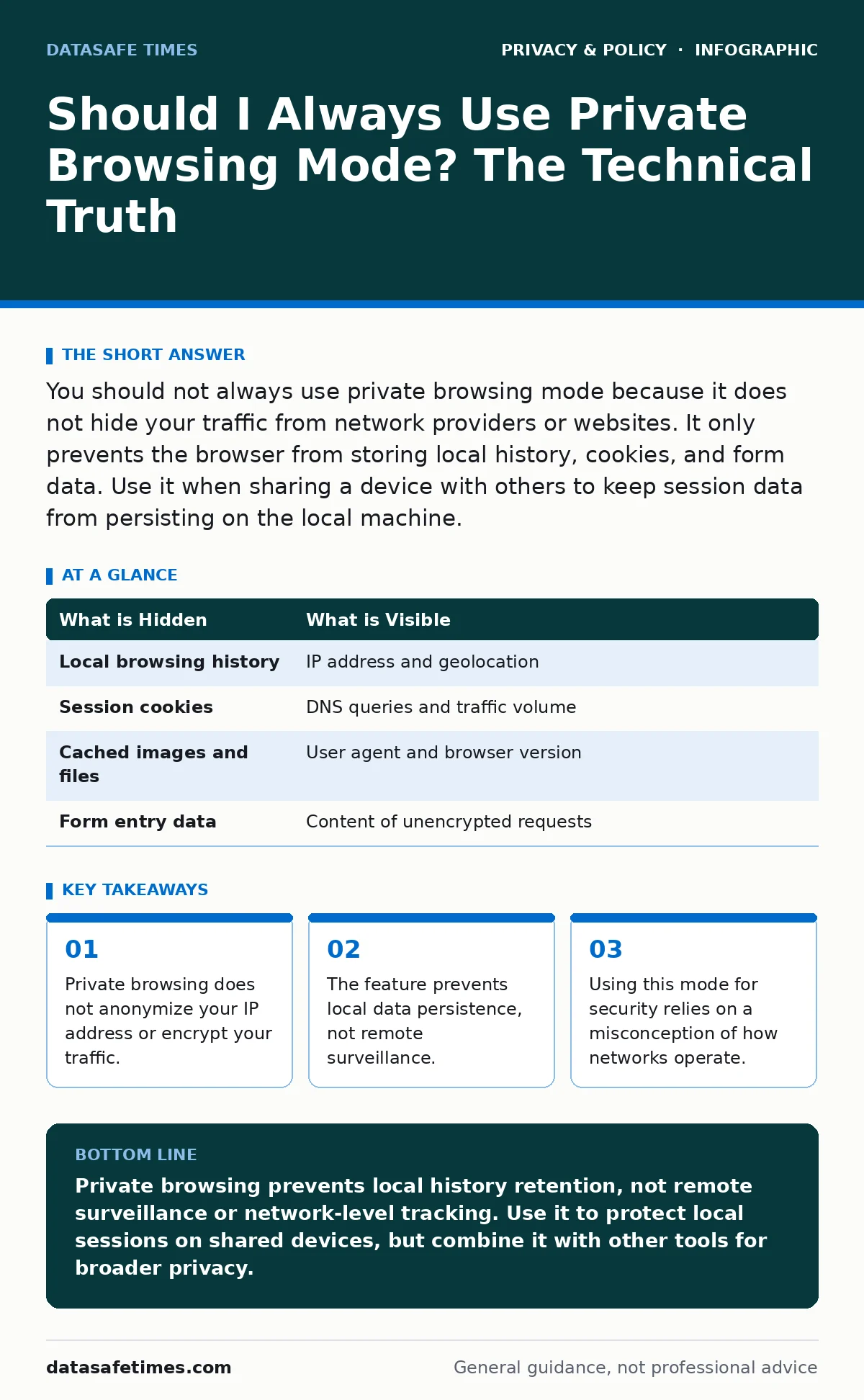
You should not always use private browsing mode because it does not hide your traffic from network providers or websites. It only prevents the browser from storing local history, cookies, and form data. Use it when sharing a device with others to keep session data from persisting on the local machine.
Should I always use private browsing mode for security?
No, you should not always use private browsing mode if your goal is security or anonymity. The feature addresses local data retention, not remote visibility. When you enable this mode, the browser creates a temporary session. It discards history, cookies, and cache upon closing the tab. This action stops other users of the same computer from viewing your previous activity. It does not prevent your internet service provider, employer, or the websites you visit from recording your actions. The confusion arises because the feature is often marketed as "private" rather than "non-persistent."
What does private browsing actually hide?
Private browsing hides local artifacts that survive a standard session. These artifacts include the address bar history, saved passwords, auto-fill data, and cached images. The browser writes this information to volatile memory or a temporary file that it deletes when the session ends. This mechanism protects your personal data from someone who picks up your laptop and opens the browser. It does not hide your IP address. It does not hide the domains you request. It does not prevent server-side logging of your user agent or screen resolution.
| What is Hidden | What is Visible |
|---|---|
| Local browsing history | IP address and geolocation |
| Session cookies | DNS queries and traffic volume |
| Cached images and files | User agent and browser version |
| Form entry data | Content of unencrypted requests |
How does the browser handle memory in this mode?
The browser allocates memory for the session without writing to the permanent disk storage for history or cookies. Some implementations write to a temporary file on disk for performance, but they delete this file immediately after the window closes. This process is vulnerable to memory forensics. An attacker with physical access to the machine while it is running can dump the RAM and recover parts of the session. The privacy guarantee applies only to the local filesystem after the session ends. It does not apply to the active memory state. You must assume the data exists in memory until the process terminates.
Why do websites still track you in private mode?
Websites track you because tracking occurs on the server side and through network-level identification. When you request a page, your browser sends headers containing your IP address and user agent. The server logs these details. Private browsing does not alter these headers. The website can also set cookies for the session. These cookies persist only while the tab is open. If you close the tab and reopen it, the website sees you as a new visitor. However, fingerprinting techniques can identify you across sessions by analyzing your screen size, installed fonts, and hardware capabilities.
Does private browsing protect against online tracking?
Private browsing offers limited protection against third-party cookies. It blocks persistent cookies from surviving the session. This prevents advertisers from linking your activity across different days. It does not prevent first-party cookies from functioning during the session. It also does not stop fingerprinting. Fingerprinting creates a unique identifier based on your browser configuration. This identifier remains constant whether you are in private mode or not. To mitigate this, you need browser extensions that block trackers or use browsers designed with privacy as a default architecture, not just a mode.
See also: Botnet Attack Warning Signs You Cannot Afford to Ignore
What are the risks for developers using this mode?
Developers often use private browsing to test login flows without logging out of their main accounts. This workflow is efficient but carries risks. If you test authentication logic, you may accidentally expose tokens or session IDs in the temporary console. More importantly, you may assume that because the session is private, the data is secure. This assumption fails if the application logs sensitive data to the local storage or indexedDB. Private browsing modes often still allow access to these storage APIs. You must verify that your application does not leak data into persistent storage even when the UI suggests it is ephemeral.
When should you use private browsing instead of a VPN?
Use private browsing when you share a physical device with untrusted users. Use a VPN when you need to hide your traffic from your network provider. These tools solve different problems. A Virtual Private Network tunnels your traffic through an encrypted channel. This hides your destination and data from local network observers. Private browsing does not encrypt traffic. It only manages local storage. Combining both provides layered defense. The VPN hides the traffic content and destination. The private mode hides the local history from other device users. Neither guarantees complete anonymity on its own.
How does this relate to legitimate interest under the GDPR?
Privacy modes do not change the legal basis for data processing. Websites may process your data under legitimate interest even if you use private browsing. The browser sends the necessary data to establish the connection. The server logs this data. The legal framework governs how the server uses that data. The browser mode governs how the client stores that data. They operate in different domains. Understanding this distinction helps you evaluate whether a privacy mode addresses your specific concern. If you worry about local snooping, use private mode. If you worry about corporate data harvesting, use mode and policy together.
Key takeaways
- Private browsing does not anonymize your IP address or encrypt your traffic.
- The feature prevents local data persistence, not remote surveillance.
- Using this mode for security relies on a misconception of how networks operate.
Private browsing prevents local history retention, not remote surveillance or network-level tracking. Use it to protect local sessions on shared devices, but combine it with other tools for broader privacy.
Frequently asked questions
Does private browsing hide my IP address?
No, your IP address is visible to the websites you visit and your internet service provider regardless of the browsing mode.
Can my employer see my private browsing history?
Yes, if you are on a corporate network, the network administrator can monitor all traffic, including requests made in private browsing mode.
Does private browsing delete files I download?
No, downloaded files are saved to your disk and remain after you close the private browsing window.
Is private browsing the same as incognito mode?
Yes, these are different names for the same feature implemented by different browser vendors.
How this guide was produced: written by the DataSafe Times editorial team with AI assistance, checked against the public references listed below, and reviewed when the facts change. See our editorial policy or report an error.