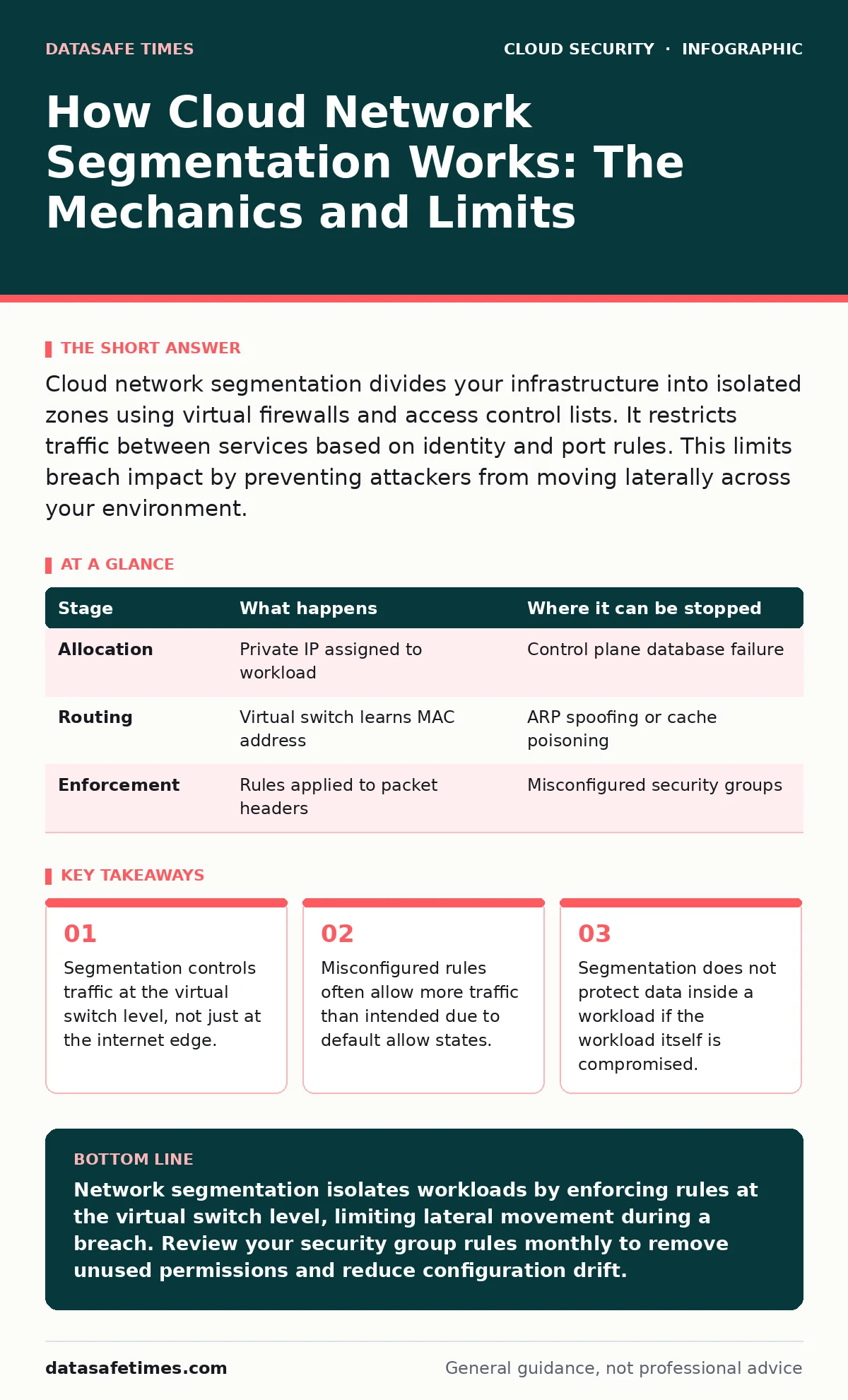
Cloud network segmentation divides your infrastructure into isolated zones using virtual firewalls and access control lists. It restricts traffic between services based on identity and port rules. This limits breach impact by preventing attackers from moving laterally across your environment.
The Virtual Boundary
Cloud infrastructure lacks physical walls. You cannot place a server in a locked room. Instead, the cloud provider uses software-defined networking to create virtual boundaries. These boundaries exist in code, not in hardware. They rely on the hypervisor, the software layer that manages virtual machines, to enforce rules.
When you request a new service, the provider allocates a slice of network capacity. This slice is logically separate from other slices. The separation is enforced by virtual switches and routers that inspect every packet. If a packet violates the rules, the switch drops it. If it complies, the switch forwards it. This process happens at wire speed, meaning it adds negligible latency.
Stage 1: Address Allocation
The first step in segmentation is assigning an identity to each workload. In cloud environments, this usually means assigning an internal IP address from a private range. This address is not visible to the public internet. It exists only within your virtual network.
The cloud provider maps this private address to a unique identifier in its control plane. This mapping allows the provider to track which virtual machine owns which address. Without this mapping, the virtual switch would not know where to send return traffic.
Imagine a workload that requests a new IP address. The provider checks the available pool in your subnet. It assigns an unused address and records the association. This record is stored in the control plane database. The data plane, which handles the actual traffic, receives an update to route packets to the correct virtual machine.
| Stage | What happens | Where it can be stopped |
|---|---|---|
| Allocation | Private IP assigned to workload | Control plane database failure |
| Routing | Virtual switch learns MAC address | ARP spoofing or cache poisoning |
| Enforcement | Rules applied to packet headers | Misconfigured security groups |
Stage 2: Rule Definition
Once the workload has an address, you must define what traffic it can receive. This is done through security groups or network access control lists. These are stateful firewalls that sit at the interface of each virtual machine.
A stateful firewall tracks the state of active connections. It allows return traffic for established connections without needing a separate rule. This reduces complexity but introduces a risk. If an outbound connection is allowed, the return traffic is implicitly allowed. Attackers often exploit this by initiating outbound connections to their own servers.
You define rules based on source, destination, protocol, and port. A rule might allow traffic from a specific subnet to port 443. Another rule might deny all other traffic. The order of evaluation matters. Most systems evaluate rules from top to bottom. The first match wins. If you place a broad allow rule before a specific deny rule, the deny rule never triggers.
Stage 3: Traffic Inspection
When a packet arrives at the virtual switch, the switch inspects its headers. It checks the source and destination IP addresses. It checks the protocol and port numbers. It compares this information against the rules defined in the previous stage.
If the packet matches an allow rule, the switch forwards it to the destination workload. If it matches a deny rule, the switch drops the packet. The workload never sees the packet. If no rule matches, the default action applies. In a secure setup, the default action is deny.
This inspection happens for every packet. It does not inspect the payload of the packet. It only looks at the headers. This means segmentation cannot stop attacks that use allowed ports. If you allow port 80, an attacker can send malicious data over port 80. The firewall will allow it because the header is valid.
Stage 4: Lateral Movement Prevention
The primary goal of segmentation is to stop lateral movement. If an attacker compromises one workload, they should not be able to reach others. Segmentation creates micro-perimeters around each workload.
Even if two workloads are in the same subnet, they can be isolated from each other. You can create a security group that only allows traffic from a specific load balancer. Other workloads in the same subnet are blocked. This is more granular than traditional subnetting.
Imagine a database server that should only accept connections from an application server. You create a security group for the database. You add a rule that allows traffic only from the application server's security group. Any other traffic, including from other servers in the same subnet, is denied. This limits the blast radius of a compromise.
See also: Cloud Security Posture Management: 6 Common Misunderstandings · Encrypted Cloud Storage: How Client-Side Encryption Protects You
Limits of Virtual Segmentation
Segmentation is effective, but it is not a silver bullet. It relies on correct configuration. If you misconfigure a rule, the boundary disappears. Humans make mistakes. Complex rule sets are hard to audit.
Segmentation also does not protect against insider threats. If a user has legitimate access to a workload, segmentation will not stop them from exfiltrating data. It only stops unauthorized network traffic.
Furthermore, segmentation adds complexity. Managing hundreds of security groups is difficult. It is easy to create overlapping rules or conflicting policies. This complexity can lead to alert fatigue in cloud logging and monitoring systems. You may miss real threats because of too much noise.
Integration with Other Controls
Segmentation works best when combined with other security measures. It should not be your only defense. You need visibility into what is happening inside your network. Cloud audit logs provide this visibility. They record changes to security groups and network configurations.
You should also manage credentials carefully. Secrets managers help you rotate access keys regularly. This reduces the risk of long-term compromise. If an attacker steals a key, they lose access when you rotate it.
For containerized workloads, consider Kubernetes network policies. These provide similar segmentation capabilities at the pod level. They allow you to define rules based on labels rather than IP addresses. This is more flexible and easier to manage in dynamic environments.
Key takeaways
- Segmentation controls traffic at the virtual switch level, not just at the internet edge.
- Misconfigured rules often allow more traffic than intended due to default allow states.
- Segmentation does not protect data inside a workload if the workload itself is compromised.
Network segmentation isolates workloads by enforcing rules at the virtual switch level, limiting lateral movement during a breach. Review your security group rules monthly to remove unused permissions and reduce configuration drift.
Frequently asked questions
Does network segmentation protect against DDoS attacks?
No, segmentation limits lateral movement but does not absorb high-volume traffic. You need dedicated DDoS protection services for that.
Can segmentation stop malware from spreading?
Segmentation can slow malware spread by isolating infected workloads, but it cannot stop malware that uses allowed ports or protocols.
Is segmentation different from firewalling?
Segmentation is the strategy of dividing networks. Firewalling is the mechanism used to enforce the boundaries. They work together.
Do I need segmentation for single-server deployments?
Yes, even single servers can be compromised and used to attack other services. Segmentation limits the impact of that compromise.
How this guide was produced: written by the DataSafe Times editorial team with AI assistance, checked against the public references listed below, and reviewed when the facts change. See our editorial policy or report an error.